Stop paging five teams for one incident
Nils Bunge
Grouping alerts makes incidents easier to read but does not change who gets paged. Paging on impact and root cause gets the right team working on it first.
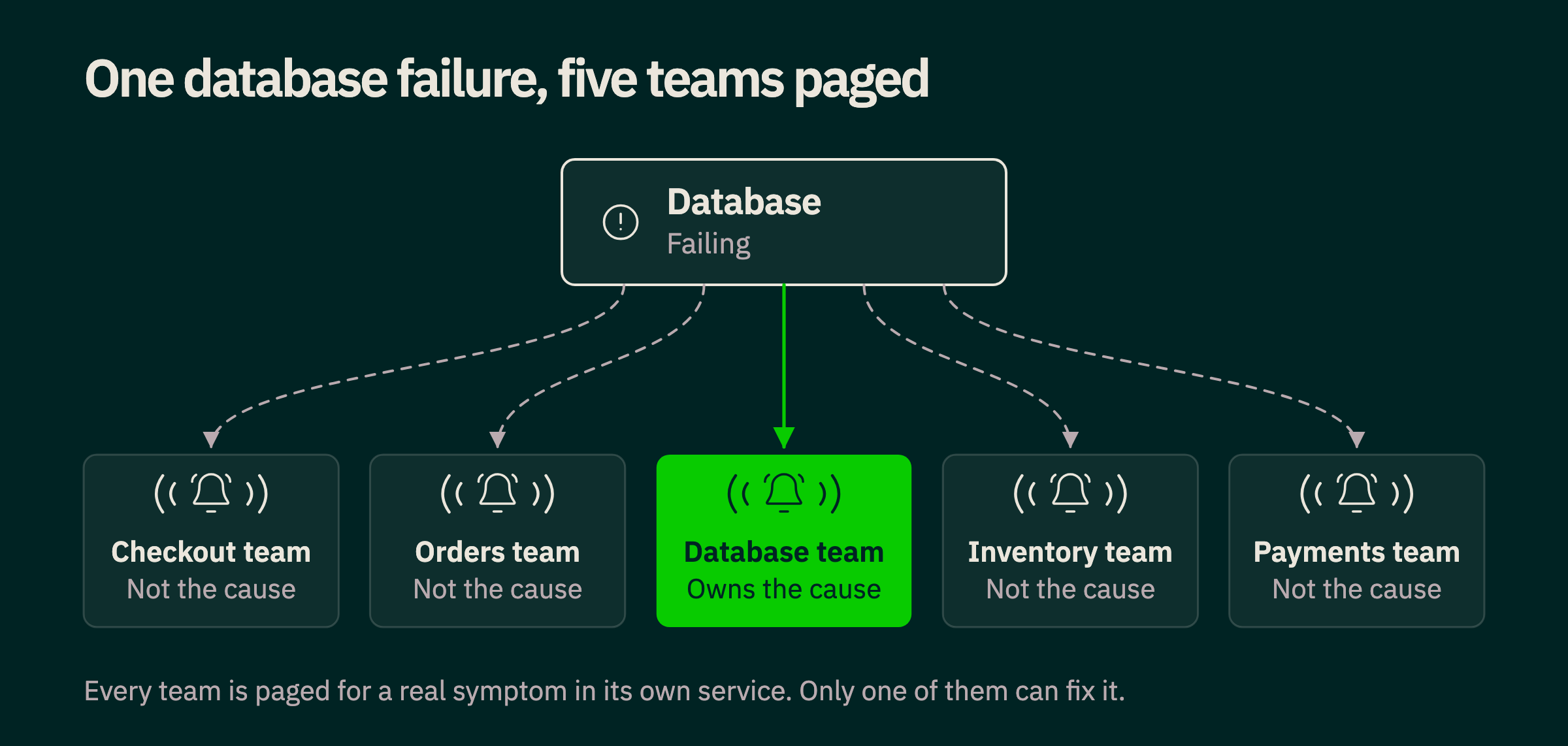
It is 3 AM and customers cannot complete their payments. Within seconds your observability platform detects problems across the infrastructure: the checkout service reports errors, the payment service times out, database connections pile up and CPU usage climbs. Five teams get paged, and each one sees a real problem in a service it owns.
Each team starts where any of us would at that hour, checking its own logs, recent deployments and unusual metrics. Nobody has the spare attention to step back and trace the whole dependency chain, so the teams only work out that every alert was a symptom of one database problem after they start comparing notes. The information to connect the dots was there from the first page.
Five teams were woken up and only one of them could fix the problem. The industry has spent years building better ways to detect, correlate and manage alerts, and the question of who actually needs to be notified has had far less attention.
When alerting was simple
In the early days of monitoring you watched infrastructure metrics such as CPU usage, memory, disk space and queue length, set a threshold on each and alerted when one crossed it. If a server ran out of memory or a disk filled up, an engineer got a notification and investigated, and the signal, the problem and the person responsible were closely linked. That worked on simple infrastructure with clear ownership and few dependencies.
Distributed systems and microservices broke that link. A single database with high latency can affect ten services, each reporting its own errors, timeouts or resource saturation, and because every team monitors its own services, one incident can trigger dozens or hundreds of notifications. On-call engineers end up spending more time acknowledging notifications, moving between monitoring tools and working out which alerts are related than fixing the cause. Every one of those alerts was accurate about its own symptom, but notifying the owner of every affected component sent the whole organization after one problem.
Automating recovery and grouping alerts
The industry responded in two ways. The first was to make infrastructure resilient enough to recover on its own: autoscaling adds capacity when demand rises, and orchestration systems restart unhealthy containers, replace failed instances and redirect traffic. Many problems that once needed a human now resolve before customers notice, which raises a fair question about why anyone should be woken for a CPU spike the infrastructure already handles. Automation only covers certain failures, though, because scaling will not fix a broken deployment, an application bug or an unavailable dependency, and it can make some of them worse.
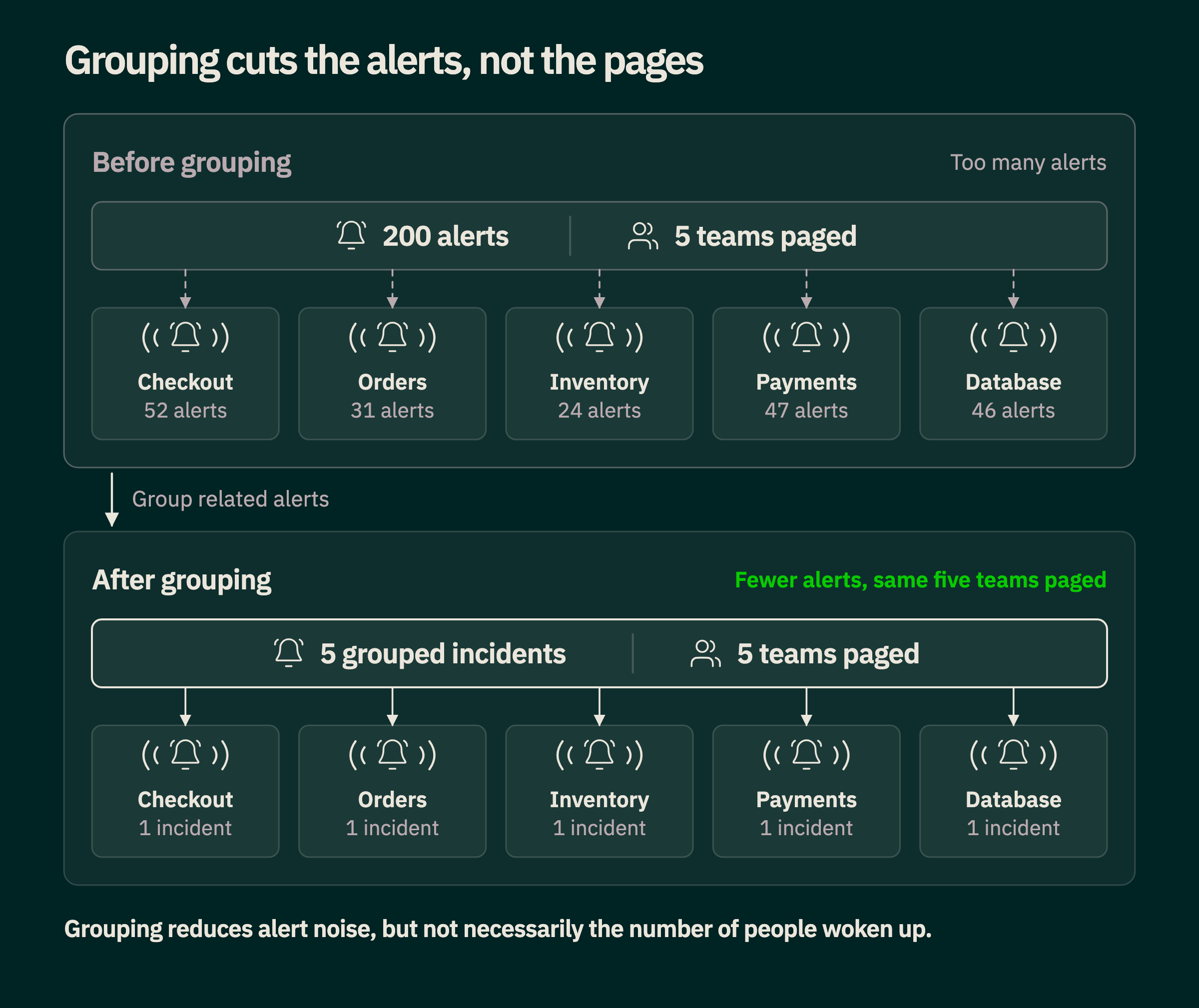
The second response was to make sense of the flood of alerts a single incident produces. Alert correlation tools, and routing systems such as Prometheus Alertmanager, group related alerts so that an engineer sees one incident instead of hundreds of notifications. That helps engineers understand an incident faster, but it does not change who gets paged. Five related alerts still wake five teams, so remediation gets easier while alert fatigue stays where it was.
Separating alerts from notifications
An alert and the decision to notify someone should be two separate things, and in Tsuga they are. Your monitors decide when something is wrong, and your notification rules consume the resulting alerts and decide whether, where and how often to notify.
A notification rule filters alerts by properties such as priority or team ownership, routes the ones that match to the right team or channel, limits how often it notifies so on-call engineers are not flooded mid-incident, and sends a reminder if an issue stays unresolved. Because the split is built into the product, you can change who hears about what without editing every one of your monitors.
That deals with having too many notifications. Cutting two hundred notifications to five still wakes five teams for the same underlying fault, so the next question is what deserves a page in the first place.
Page on impact, not on symptoms
Service level objectives (SLOs) moved alerting from individual metrics toward the experience customers actually get, which is the thinking behind the site reliability engineering (SRE) practice at Google and the move to SLO-based alerting. Take a service running at 85% CPU. If it still answers within its latency objective, requests succeed and autoscaling is absorbing demand, nobody needs to be woken up. Now take the opposite case, where customers cannot complete payments while CPU, memory and every infrastructure metric look healthy, and the question of which one deserves a page answers itself.
Paging on impact means paging when availability, latency, successful transactions or error budget burn show a real degradation of the service, and treating technical signals as context. Some conditions still deserve a page before customers feel anything, such as a database about to run out of disk, so the aim is not to remove technical alerts but to separate conditions to investigate from conditions that need a human right now.
That is a real improvement, but impact alone does not tell you which team should fix the problem. An SLO on checkout success fires for the checkout team's service even when the cause sits three services away.
From alert correlation to adaptive notifications
Application performance monitoring (APM) systems already collect most of what is needed to answer that question. Distributed traces show which services call each other, how requests travel and where errors or latency appear, and from them you can build a dependency graph. The graph has mostly been used after the fact, when someone is paged, opens a trace view and narrows down the cause by hand, which raises the question of why we wait until someone is awake to use it.
Adaptive paging is the practice of using that graph to decide who to page, and adaptive notifications are how Tsuga does it. The practice is not common. Most teams use their traces after the page, to help with remediation, and only a few engineering organizations running hundreds of services have built it for themselves to decide who gets paged. We built it into the platform so you do not have to write and maintain it.
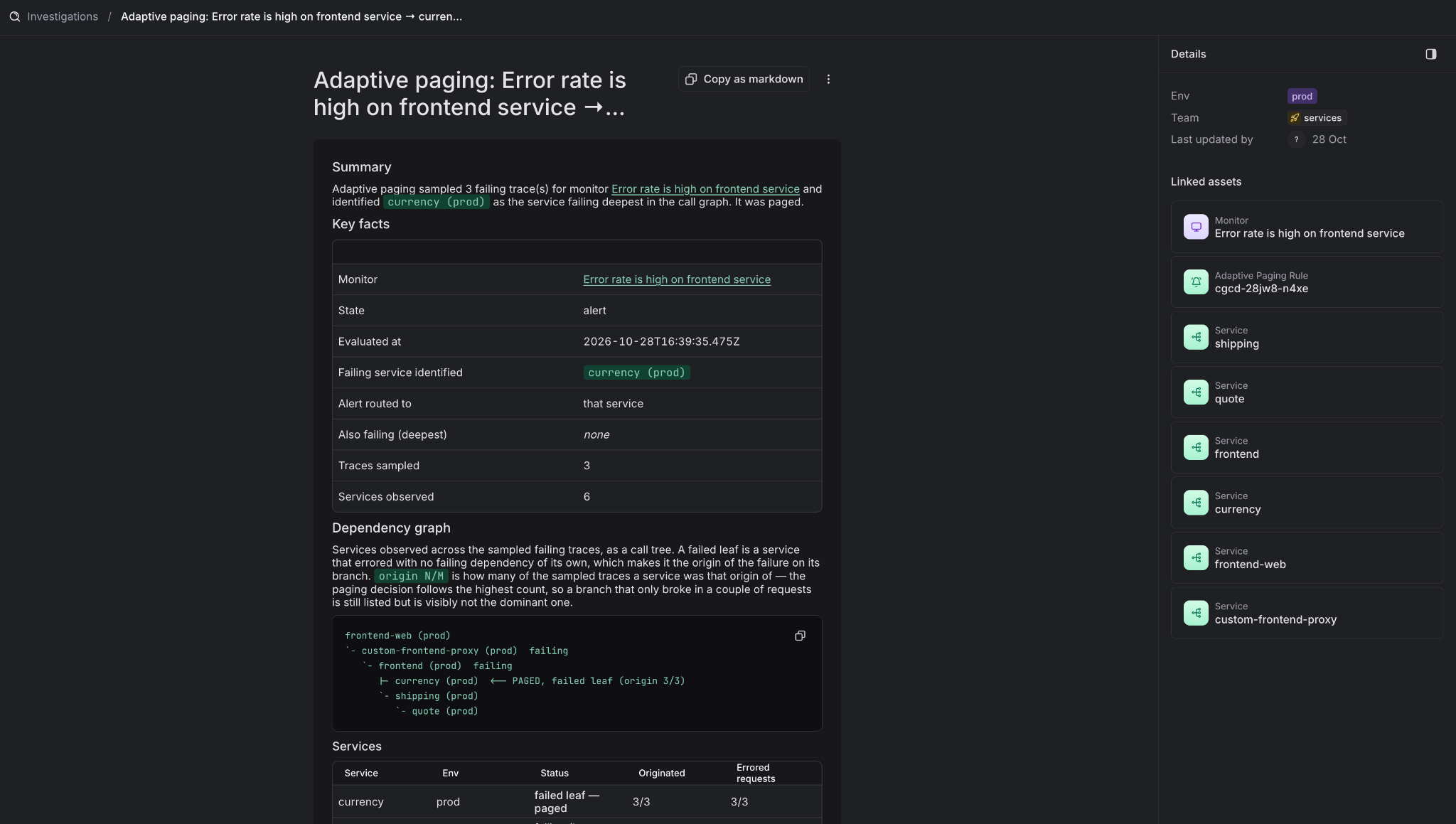
Coming back to the payment example. Customers cannot complete transactions and an SLO alert fires because checkout success has dropped below its objective. Instead of notifying the checkout team, adaptive notifications start from that customer impact, read the traces behind your alert and walk the dependency tree to find which services are failing and which are only passing the error along. Errors travel up a call chain, so the service reporting the most failures is often just reflecting a problem further down, and the analysis looks for the service that is failing while nothing it calls is.
The page then goes to the destination you set for that service in the service catalog. When more than one branch is failing, the notification lists the other failing branches so the paged team sees them too, and when an alert cannot be attributed with confidence, or the service at fault has no destination yet, the page goes to your rule's fallback destination so it is still delivered. The aim is not a perfect diagnosis before anyone is notified but a better first decision from information we already have, without delaying the response when that information is incomplete.
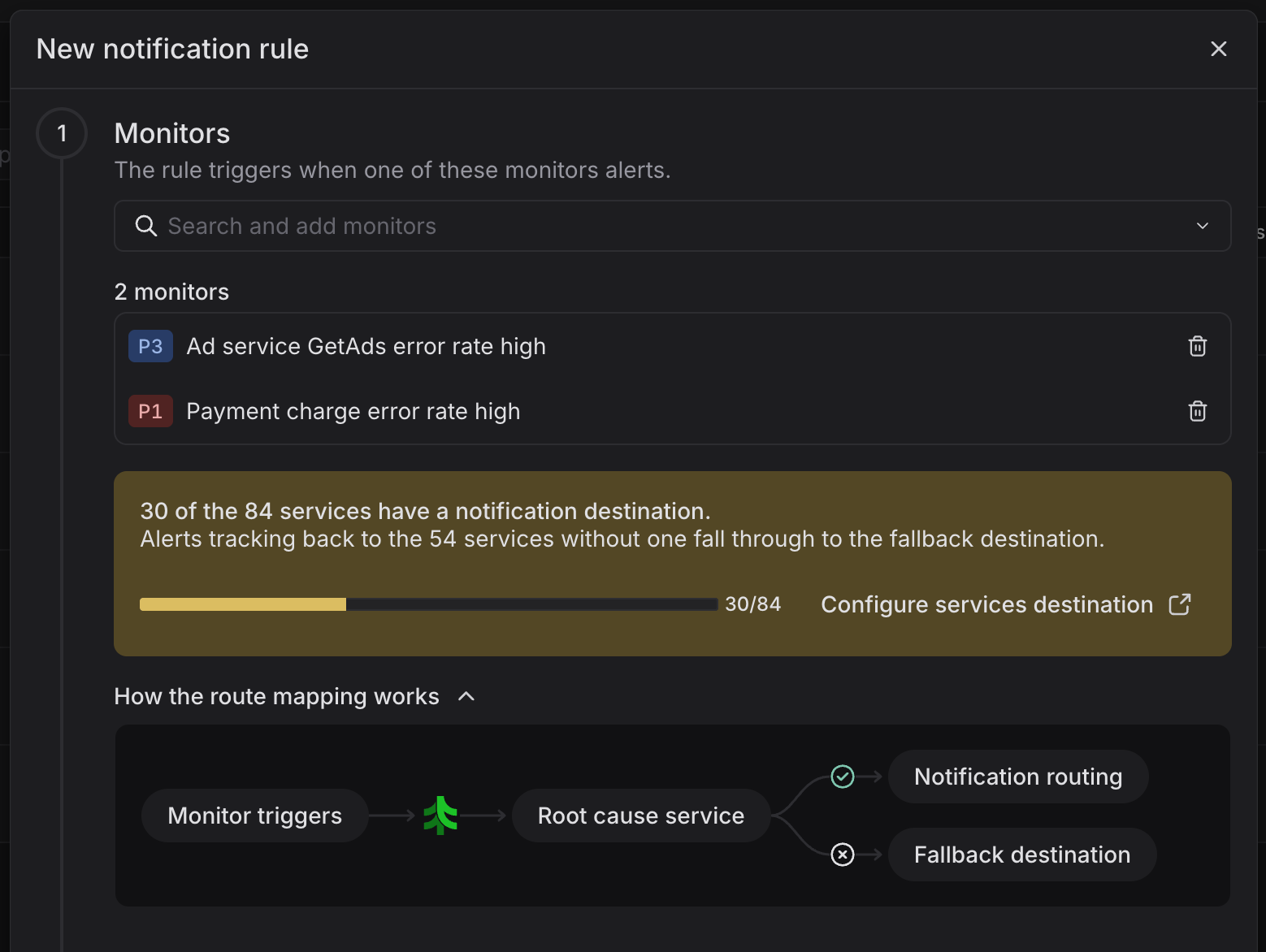
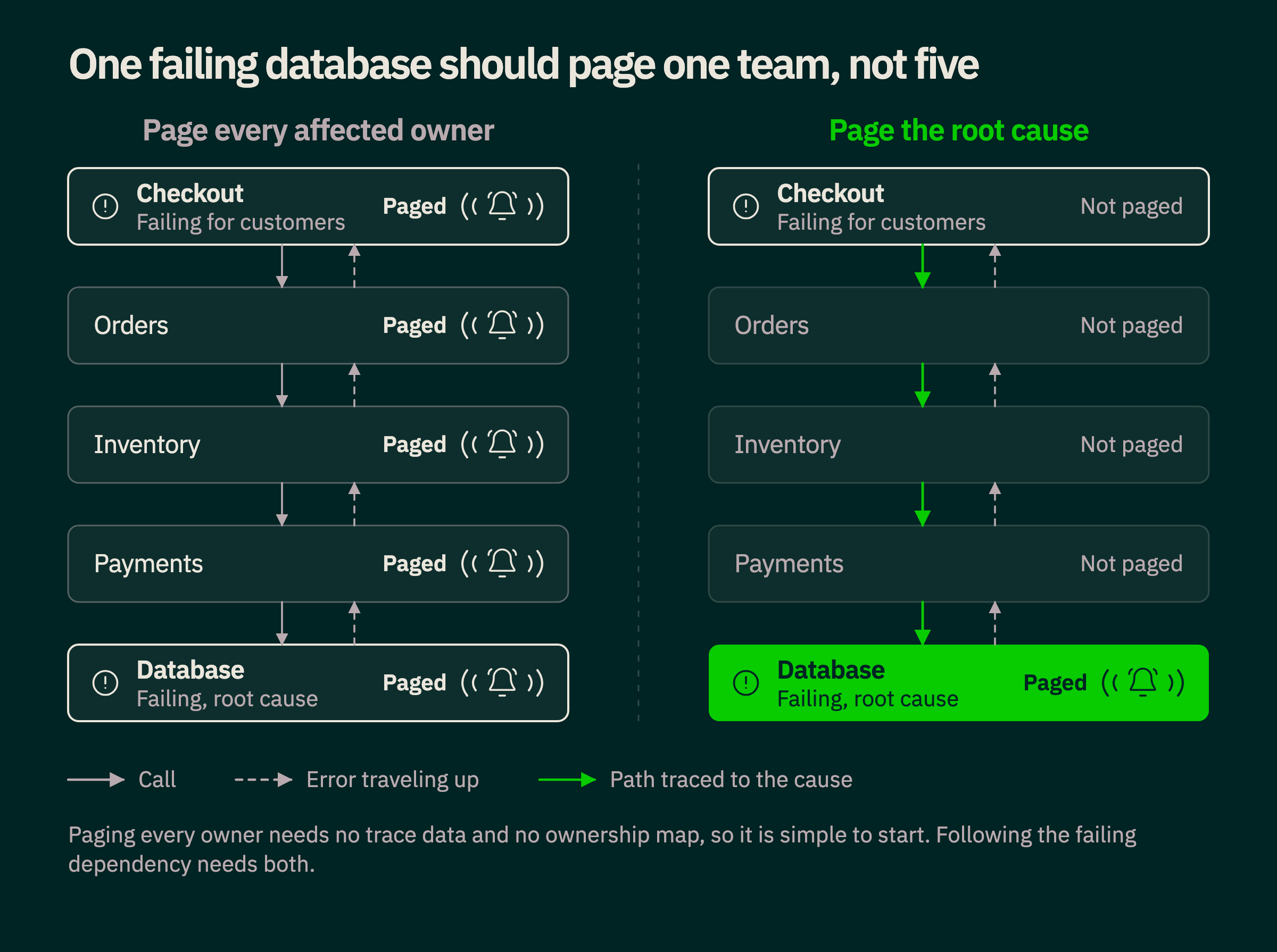
This reverses the traditional alerting workflow. Instead of detecting technical issues, notifying everyone and correlating the alerts afterwards, you start from impact, find the likely cause and page the people who can act on it. You can read how it works in more detail on our adaptive notifications page.
Technical signals become investigation context
Treating technical signals as context changes what they are for. Imagine a database running out of connections, a new deployment of one service and rising network latency between two others. Each might matter, but none of them needs its own page, and together they are evidence for why a customer-facing problem is happening.
When a payment SLO starts failing, an investigation should be able to look at recent deployments, compare resource use before and after the incident, check for abnormal network behavior and see whether a downstream service is nearing capacity. Those are the questions an on-call engineer asks after being paged, and many of them do not need a technical alert configured in advance. Technical monitoring stays valuable for preventive maintenance and for conditions that lead to imminent failure, but not every signal needs a notification attached: collect everything needed to understand a problem, and interrupt people only when they need to act.
Investigations prepared before a human wakes up
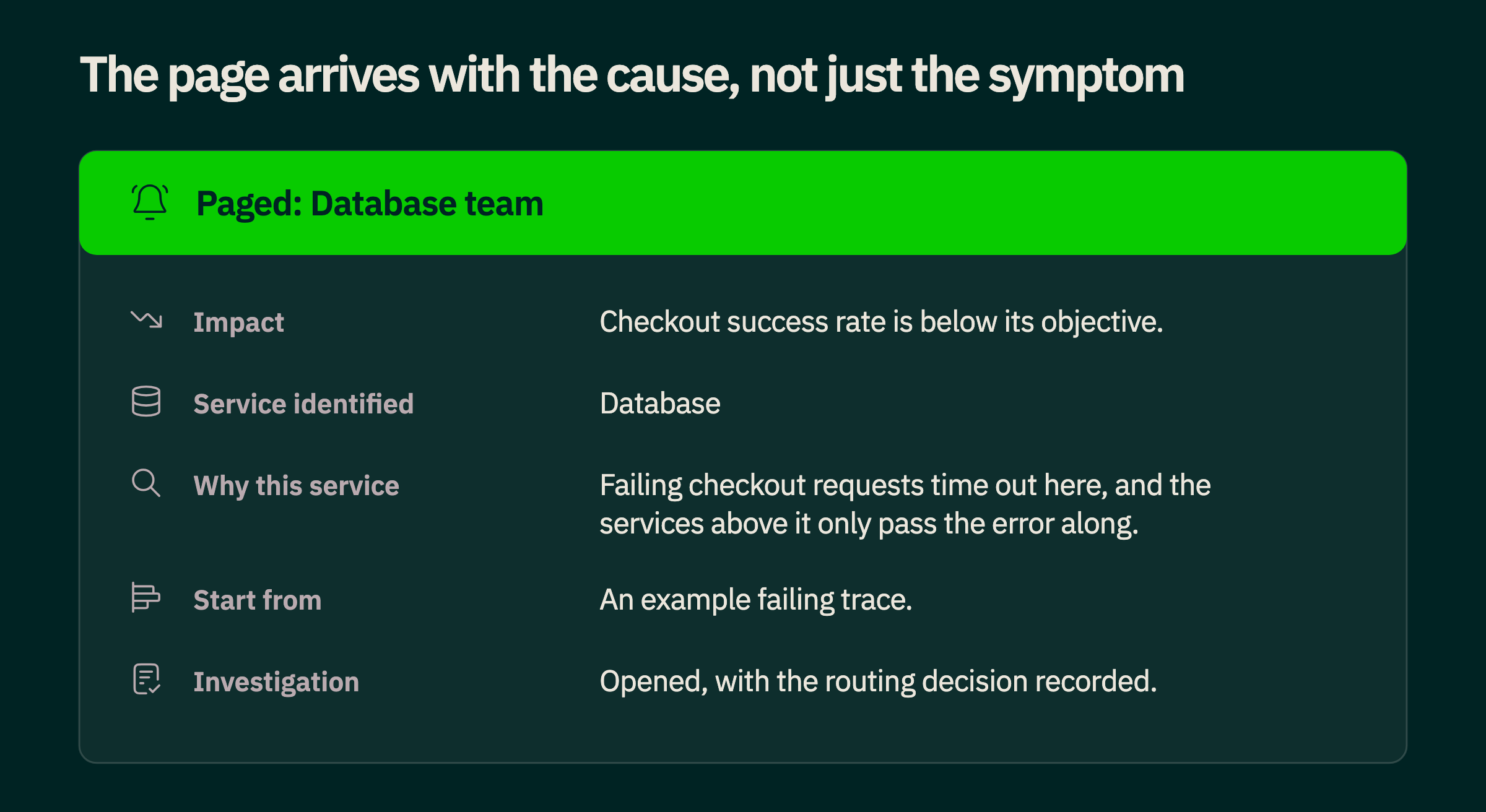
Once you know customers are affected and which team is most likely responsible, the on-call engineer should not have to start the investigation from scratch. Every adaptive notification already carries the service identified, why it was chosen and an example trace, and it opens an investigation that records how the routing decision was made. The next step is to go further: agents that query your observability data, explore service dependencies, inspect recent changes and review past incidents could prepare the rest before your engineer opens a laptop, including the impact, the likely cause with its supporting evidence, recent changes, similar failures from the past and suggested next steps.
Agents make investigation easier to automate and add a new cost, because a recurring, low-impact problem that has already been diagnosed does not deserve the effort a major outage does. The depth of an automated investigation should adapt to the incident. It can start with an inexpensive check for a known pattern, recent changes and the scale of the impact, and spend more only when severity, novelty or business consequence justify it. For an unfamiliar incident that blocks thousands of checkouts, exploring several hypotheses is worth the cost, and for a known recurring problem, pointing the engineer at the previous investigation may be enough.
This is not about agents resolving every production issue on their own. Automated remediation will get more capable, but some fixes carry operational or business risk and need human judgment. What matters is that when a person does need to step in, they receive the most useful information available instead of reconstructing the incident themselves.
The future of alerting is fewer interruptions
Observability has moved from watching individual components to running complex distributed systems. Autoscaling and automated recovery removed some manual work, correlation tools reduced noise, SLOs focused alerting on customer impact and separating alerts from notifications gave teams control over when they are interrupted. Each step solved part of the problem, but the workflow underneath stayed the same: detect something, notify someone and let them work out whether they are the right person.
The next step reverses that logic. Start with actual or imminent customer impact, use observability data to find where the problem comes from, identify the responsible team and prepare as much of the investigation as possible before involving a human. That does not mean detecting fewer problems, since you may analyze more telemetry and more potential causes than ever, but how often your people are interrupted, and how long they spend understanding an issue before they can fix it, should drop.
The goal of alerting is not to tell everyone that something is wrong but to get the right people working on the right problem, with the right information, as quickly as possible, and to let everyone else sleep. If you want to see adaptive notifications running against your own services, talk to an architect and we will walk you through it.